Multi-city flights for business travel

Multi-city flights match the way business actually moves: forward, across borders, on one ticket.
سابق المدونة التالي المدونة

Why use multi-city flights for business travel

Business travel rarely follows a simple A-to-B pattern. Multi-city flights let business travellers visit multiple destinations on a single ticket, saving time and money compared to round-trips or separate one-way bookings. For trips with two or more stops — client visits, conferences, regional office tours — they're almost always the smarter choice. This guide explains how multi-city flights work, how to book them, how to find cheaper fares and the mistakes to avoid.  

Time and cost efficiency

Booking a single multi-leg flight is almost always cheaper and faster than buying a stack of one-way tickets for the same route. When you compare multi-city flights against the alternative of stitching together individual segments, you typically benefit from bundled pricing that airlines offer for connected travel, plus a single confirmation, a single check-in flow and one customer service contact if something goes wrong.

For people who fly often, multi-city flights compound their advantages. Every leg still earns frequent-flyer miles and status credit, often within the same alliance, so you build loyalty benefits faster than you would with fragmented bookings on different carriers.

Avoiding backtracking and optimising meeting schedules

The strongest argument for flights with multiple destinations is geographic logic. If your meetings are in Berlin on Monday, Munich on Wednesday, and Vienna on Friday, flying home between each one is absurd — but so is booking three disconnected one-ways. A well-built multi-city flight itinerary lets you move forward through your schedule in a straight line, matching the natural flow of your meetings rather than fighting it.

Step-by-step guide: How to plan a multi-city itinerary

Choosing the right flight search tools

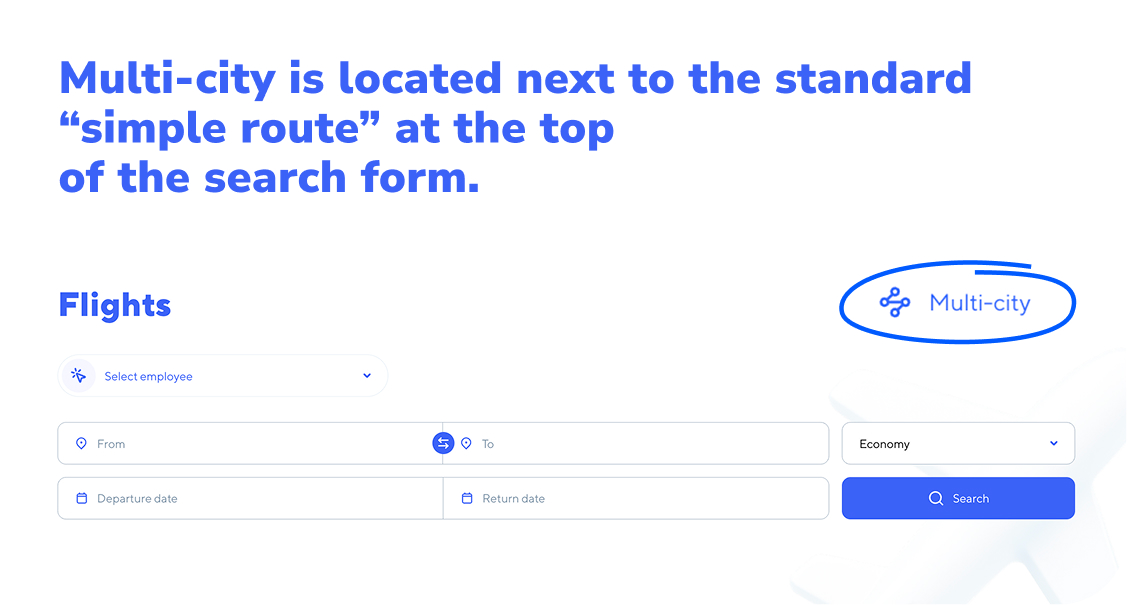
Flying like a pro starts with searching for flights like a pro. Knowing how to book multi-city flights efficiently comes down to three things: the right tool, a clean entry process and careful checking. Fortunately, with Tumodo, this is easy to do, as the “multi-city” option is located next to the standard “simple route” at the top of the search form.
9d384ea2-17c7-4c19-865b-e59ece6bf21e.jpg

Adding multiple stops on Tumodo

Tumodo is built so that you can add multiple stops in about a minute. Here's how:

  1. Open the Tumodo flight search.
  2. Enter your first leg. Fill in the origin, destination, and departure date for the first flight.
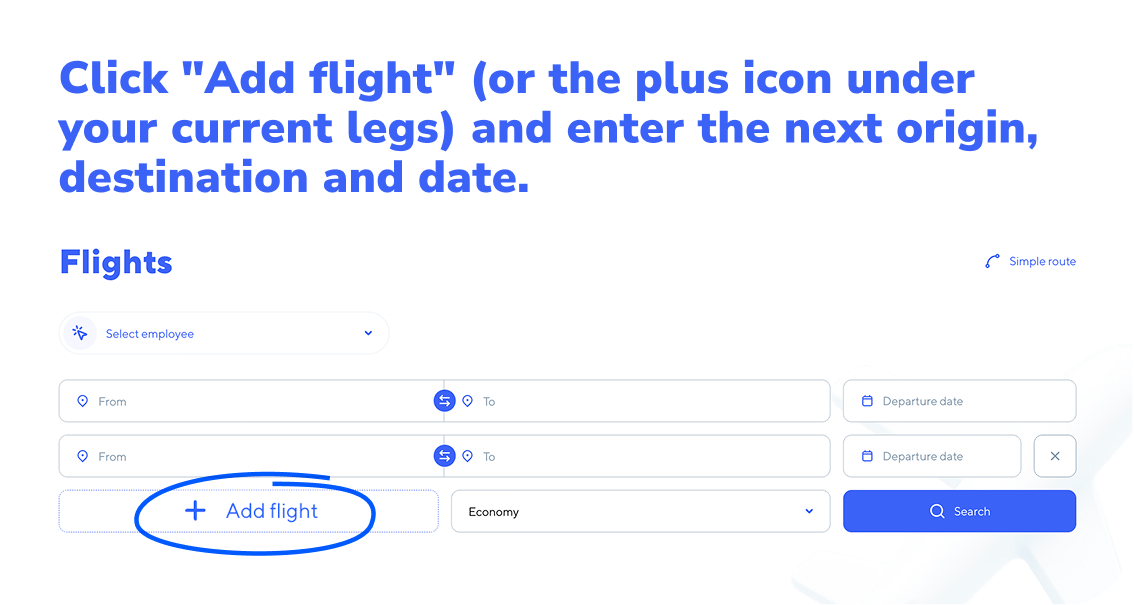
  3. Add the next leg. Click "Add flight" (or the plus icon under your current legs) and enter the next origin, destination and date.b3c497e7-a06e-4d12-99b3-a425b552b50c.jpg
  4. Repeat for every stop. You can stack legs until your full itinerary is built.
  5. Set passengers and cabin class once for the whole itinerary.
  6. Search and compare. Tumodo returns combined fares across airlines and alliances, so you can compare full multi-city itineraries side by side rather than pricing each leg individually.

Don’t forget to check baggage allowance, layover times and total trip duration before confirming. The booking comes back as a single ticket with one reference number.

For business accounts, your traveller profiles, payment methods and travel policy rules apply automatically across the whole itinerary.

Tips for entering dates and destinations correctly

Most multi-city booking mistakes happen at the input stage, not during the actual purchase. A few practical habits prevent the common ones:

  • Build the itinerary on paper first. Before opening a booking tool, write out the cities and dates in order. It's much easier to catch a sequencing problem on a notepad than in a search form.
  • Use airport codes when a city has multiple airports. London has six, New York has three, Paris has two. Typing "London" might pull a default the platform chose for you, so specify LHR, LGW, or LCY directly when it matters.
  • Leave realistic buffers between legs. Give yourself enough time after each arrival. For international connections through a single airport on the same day, two to three hours is the safe minimum. To do this, you can select the minimum and maximum stop duration in the search options.
  • Watch for overnight legs and time-zone shifts. A flight that "arrives the same day" can actually land the next morning local time. Confirm arrival dates before locking in your next leg's departure.

Tips to find cheap multi-city flights

Finding cheap multi-city flights comes down to a handful of habits — most of them about flexibility. The main tip we've already mentioned in our blog is booking flights well in advance. For international multi-city trips, the sweet spot is usually 6 to 12 weeks out. Booking less than three weeks ahead almost always costs more. Seasonality matters too, as does your choice of airport and whether you take a direct flight or accept a connection.

Be flexible with your dates

The single biggest lever on the price of multi-stop flights is when you fly. Multi-city fares swing widely depending on the day of the week and time of day for each leg:

  • Shift legs by a day or two. Flying out on a Tuesday or Wednesday is often cheaper than Monday or Friday. Even moving one leg by 24 hours can change the total fare noticeably.
  • Avoid peak business-travel days. Early Monday morning and late Friday afternoon flights are priced for travellers who can't avoid them. If your meetings allow, fly the day before or after.
  • Watch for shoulder seasons. Booking around the edges of busy periods — early September, mid-January, late April — typically delivers lower fares than peak travel weeks.

Be flexible with your airports

Most major business destinations are served by more than one airport, and the price difference between them can be substantial:

  • Check secondary airports. Flying into Gatwick instead of Heathrow, or Beauvais instead of Charles de Gaulle, can cut the fare meaningfully.
  • Mix airports across legs. You don't have to depart from the same airport you arrived at. Flying into one airport and out of another in the same city sometimes unlocks better combinations.
  • Consider nearby cities as entry or exit points. If you're meeting in Geneva, flying into Lyon or Zurich and taking a train might be cheaper overall — especially on busy routes.

Get these basics right and a multi-city flight booking takes no more effort than a standard round-trip.

Multi-city flights vs round trip flights

A round-trip is two flights: out to one destination and back to where you started, while a multi-city itinerary is three or more flights connecting different cities in sequence, all booked as one ticket.

For example, if you need to visit Paris and Rome, a round-trip makes you fly to Frankfurt → Paris → Frankfurt → Rome → Frankfurt. A multi-city does Frankfurt → Paris → Rome → Frankfurt, so you skip an entire return-and-redeparture cycle, saving a flight, a day and often a hotel night and an extra day away from productive work.

Multi-city flights vs one‑way tickets

A one-way ticket is a single flight from point A to point B, booked on its own with no return or onward leg attached. If you need to visit three cities, you'd buy three separate one-way tickets — each as its own booking, often on different airlines, each with its own rules and confirmation.

A multi-stop flight bundles those same flights into one ticket. Origin → City A → City B → City C, all under a single booking reference, typically on the same airline or alliance.

اطلب عرضًا توضيحيًا لمنصة Tumodo

قدّم بيانات شركتك وسيقوم فريقنا بالتواصل معك لترتيب مكالمة عرض توضيحي

ALT for tumodo element form

سيتصل بك مديرنا قريبًا لتوضيح جميع التفاصيل.

إعادة الإرسال